Network Monitoring Reports That Answer the Reader’s Question
Your customer does not need every metric your technicians examine. They need a clear explanation of what happened and what deserves attention next.
Build Lumics reports around that purpose. Select relevant monitoring information and share a structured update with the intended audience.
Schedule a DemoDiscover how For MSPs and Multi-Tenant Monitoring elevate visibility across accounts.
Choose the information before the format
A weekly service review may focus on recurring incidents. A capacity discussion may need evidence of growing demand over a longer period.
Combine data using Flexible Shareable Dashboards alongside comprehensive Network Monitoring.
Choose the data sources and reporting window that support the decision. Add enough context that a recipient can distinguish an isolated event from an ongoing pattern.
Highly Customizable
Lumics reports, similar to our dashboards, can be customized using any combination of the data sources we ingest and analyze.
Reports can be as simple or as detailed as you want depending on their use and the desired end recipient(s).
Select the data sources and timeframes you want to summarize and analyze, and add it to a report that you can easily share with various people inside (team members) and outside (customers, partners, vendors) your organization.
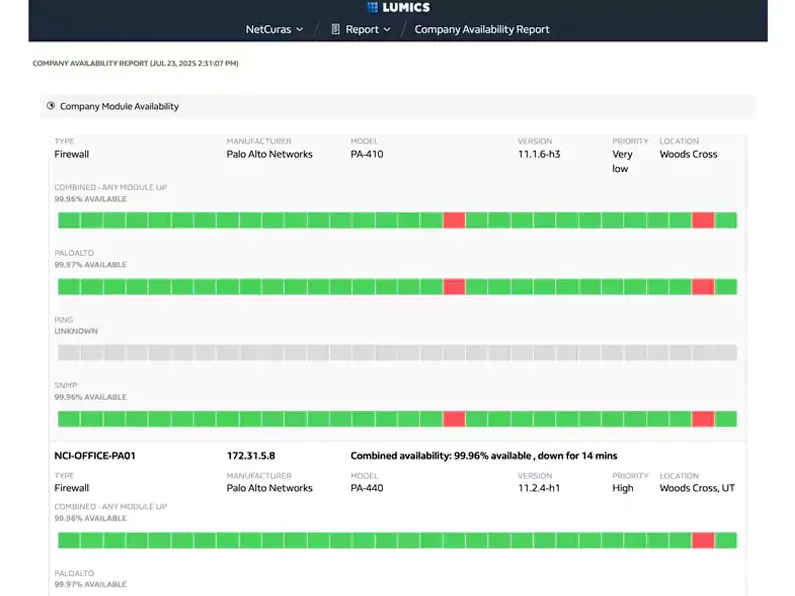
Reports can be used to show device uptime, hardware performance issues, and capacity for growth; latency and packet-loss between physical locations; specific devices that are consistently consuming high amounts of bandwidth and why; expiring certs and when they need to be renewed; and much more.
Automated
Lumics reports can be generated and then shared on an automated schedule or triggered by a specific event, and different roles can receive report(s) that are customized to their specific needs or interests.
Create custom schedules with day, time, and frequency controls to determine when certain types of reports should be created and sent.
Establish automated triggers using Intelligent Alerts to generate and deliver reports immediately when incidents occur.
Stored and Downloadable
Reports can be stored for a time period that you decide (up to 13 months) and downloaded from the client portal to be shared via email or text or Slack whenever needed, especially for recipients that might not have been included in the initial automated delivery or for historical reference later on.
Shareable
Reports can be shared via email, SMS, or Slack and are always accessible within the portal to team members with the correct privileges.
Reports are the perfect way to keep team members and clients informed with the insights and historical data they need without them needing to log in to the system.
We Can Help You Customize
Lumics provides many basic reports but can also help you build the perfect reports for your needs, all part of our concierge-level customer service that is included in every contract.
Schedule a Demo